
How to Use AI Agents in 2026: A Beginner’s Guide
AI agents can research, use tools and complete multi-step tasks instead of simply answering questions. This beginner’s guide explains what they are, where they are useful and how to start using them safely.
AI is moving from answering to doing
Most people learned to use generative AI through a simple pattern.
You ask a question.
AI gives you an answer.
That model is changing.
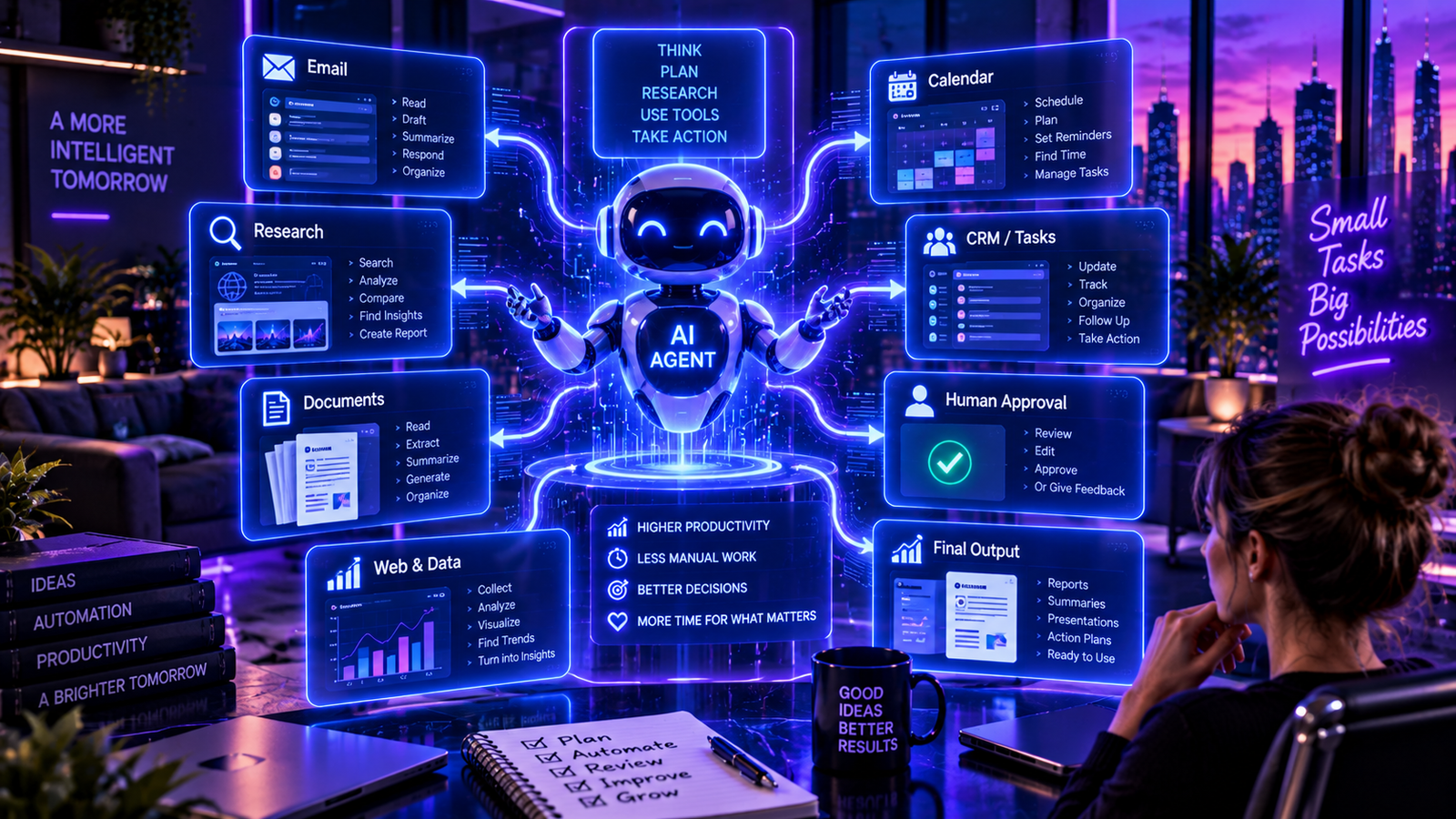
The newest generation of AI systems can be given a goal, work through multiple steps, use connected tools and produce a finished result.
These systems are commonly called AI agents.
The difference sounds small, but it represents one of the biggest changes happening in artificial intelligence in 2026.
Instead of asking AI how to do the work, you can increasingly delegate parts of the work itself.
What is an AI agent?
An AI agent is a system designed to pursue a task rather than simply respond to a single prompt.
OpenAI describes the basic structure of an agent as having a trigger, a process or set of skills, and tools or systems it can access.
Imagine asking a normal chatbot:
“How should I research my competitors?”
It might give you ten steps.
An agent can potentially be asked:
“Research these five competitors and prepare a comparison report.”
It can then gather information, organize findings and create the report for you.
That is the fundamental shift.
Chatbots answer. Agents act.
Agents can work through multiple steps
Traditional software automation usually follows predetermined rules.
If A happens, do B.
AI agents are different because the model can interpret information and decide how to proceed within the permissions and instructions it has been given.
A research task, for example, might require an agent to:
- identify useful sources,
- search for information,
- read those sources,
- compare the findings,
- identify missing information,
- perform additional research,
- organize the results,
- create a final report.
That ability to continue working toward an objective is what makes agents different from ordinary AI conversations.
OpenAI describes this shift as moving the unit of knowledge work from individual interactions toward delegated, longer-running tasks.
What can AI agents actually do?
The most useful agents are usually not science-fiction robots running entire companies.
They handle specific workflows.
An agent might research potential customers and prepare a sales brief.
Another might analyze incoming support requests and organize them by priority.
A marketing agent could research a subject, collect sources and prepare a first draft.
A coding agent could inspect a codebase, identify a problem, modify files and test a solution.
A reporting agent could gather information from several business systems and prepare a recurring report.
These are much more realistic applications of agentic AI.
Start with repetitive work
If you are new to agents, do not begin by asking one to manage your entire business.
Start with something boring.
That is often where agents are most valuable.
Look for a task that is:
- repeated regularly,
- reasonably structured,
- time consuming,
- based on information the agent can access,
- easy for you to verify afterward.
OpenAI similarly recommends agents particularly for repeatable, structured, tool-based or event-driven work.
A weekly competitor report is a good candidate.
“Make all of our strategic decisions” is not.
Give the agent a clear objective
The quality of an agent depends heavily on how clearly its job is defined.
Instead of:
“Help me with marketing.”
try something closer to:
“Every Monday, review our competitors’ latest public announcements, identify the three most important developments and prepare a short report explaining why each one matters.”
The second instruction defines:
what to examine,
when to do it,
what matters,
and what the final output should look like.
You are essentially writing a job description for a digital worker.
Give it the right context
An intelligent agent without context can still produce poor work.
If you want an agent to prepare customer-support responses, it needs access to the relevant support policies.
If it is analyzing your products, it needs accurate product information.
If it is preparing a business report, it needs to know which metrics matter.
This is why connected data is becoming such an important part of agentic AI.
The model provides intelligence.
The context tells that intelligence how your particular organization works.
Tools are what make agents powerful
An agent becomes significantly more useful when it can interact with tools.
Depending on the system and permissions, those tools might include:
email,
documents,
calendars,
databases,
web browsers,
CRMs,
project-management systems,
code repositories,
or other business applications.
OpenAI’s current workspace agents, for example, can be configured for repeatable workflows, connected to tools, scheduled and shared across a workspace.
This is where agents begin moving beyond ordinary chat.
They are not merely generating information.
They are operating within a workflow.
A simple beginner workflow
Suppose you run a small online business.
Every Friday you want to understand what happened during the week.
A useful agent workflow might be:
Step 1: Gather the week’s sales information.
Step 2: Compare it with the previous week.
Step 3: Identify unusually strong or weak products.
Step 4: Review relevant customer feedback.
Step 5: Summarize the most important changes.
Step 6: Produce a one-page report.
Step 7: Suggest three things a human should investigate.
Notice the final step.
The agent does not need to make every decision.
It can prepare better information so that a person can make the decision.
Do not give an agent unlimited access
This is one of the most important rules.
An agent should have access only to the tools and information required for its job.
If an agent only needs to read a document, there is little reason to give it permission to delete that document.
If it prepares emails, you may initially want it to create drafts rather than send messages automatically.
If money is involved, human approval becomes even more important.
Security specialists refer to this principle as least privilege — providing only the minimum permissions necessary to perform the task.
Microsoft warns that poorly scoped agent permissions can increase the potential impact of mistakes or attacks because agents may operate across several systems during one workflow.
Keep humans involved in important decisions
Automation does not mean removing people from every process.
For consequential actions, human approval can be an essential safety layer.
Examples include:
sending payments,
signing agreements,
deleting important data,
publishing sensitive material,
changing customer accounts,
or making decisions that significantly affect people.
Microsoft’s responsible AI guidance recommends human approval for actions that are difficult to reverse or involve people, money or compliance.
A useful rule for beginners is simple:
Let the agent prepare. Let the human approve.
You can increase autonomy later when you understand how reliably the workflow performs.
Watch out for prompt injection
Agents introduce another risk that ordinary chatbot users may rarely think about.
An agent that reads websites, documents or messages can encounter malicious instructions hidden inside that content.
This is known as prompt injection.
An attacker might attempt to place instructions in information the agent reads, hoping to manipulate what the agent does next.
The problem becomes more serious when an agent has permission to take actions.
Microsoft Research describes indirect prompt injection as an important threat for agents performing consequential actions.
That is another reason permissions, monitoring and human approval matter.
Test before you automate
Do not immediately schedule a new agent to run indefinitely.
Test it.
Give it several examples.
Try unusual situations.
Check whether it uses the correct information.
Look for cases where it misunderstands the task.
Then improve its instructions.
OpenAI’s current guidance recommends beginning with low-risk requests, reviewing the results and using human judgment while learning how the agent behaves.
Treat the first version as an experiment.
Measure whether it actually saves time
AI automation can look impressive without creating much value.
Measure the result.
How long did the task take before?
How much human work is still required?
How often does the output need correction?
Is the result actually better?
How much does the AI workflow cost?
If an agent saves ten minutes but requires fifteen minutes of checking, you have not automated much.
The goal is not to use an agent.
The goal is to improve the workflow.
Agents are spreading beyond software development
Coding was one of the first areas where agentic AI became highly visible.
But the pattern is spreading.
OpenAI reported in August 2026 that weekly active enterprise Codex users since February had grown 108× in legal, 41× in sales, 41× in recruiting and 26× in marketing, compared with 5× in engineering.
The figures do not mean every task in those departments has become automated.
They do show how quickly agentic AI is moving beyond programming.
Research, recruiting, sales, marketing and operations are becoming part of the same transition.
The best first agent is probably boring
People naturally imagine spectacular AI agents.
But your most useful first agent might simply prepare the same report every Friday.
Or organize incoming information.
Or research prospects.
Or turn meeting notes into structured follow-up tasks.
That is fine.
The goal of an agent is not to look futuristic.
It is to remove repetitive work.
Start small, then expand
A sensible beginner strategy is:
One task. One agent. Limited permissions. Human review.
Run it repeatedly.
Measure the results.
Fix the problems.
Only then give it more tools or autonomy.
This approach is less exciting than telling an AI system to “run my company.”
It is also much more likely to work.
The future is delegation
Enterprise AI usage already shows the direction of travel.
OpenAI reported that as of June 2026, agentic AI usage represented 64% of combined Codex and ChatGPT output tokens among its enterprise customers. Because agentic workflows tend to be longer and produce more output, that figure should not be interpreted as 64% of tasks — but it still illustrates how quickly delegated AI work is expanding.
The first generation of generative AI taught people how to prompt.
The next generation may teach people something different:
how to delegate.
And that may ultimately be the more important skill.